
Resize in any unit
Exact pixels for the web, a percentage to shrink quickly, or inches and centimetres at 300 DPI for printing. Proportions are kept automatically, so nothing looks stretched.
Choose a photo, pick the size you need — exact pixels, a percentage, inches or centimetres — and download. Crop it, rotate it, or keep the file under 50 KB, 100 KB or 500 KB for e-mail and online forms. Everything happens right here in your browser.
or
JPG · PNG · WebP · GIF · BMP · HEIC · TIFF · SVG — up to 40 MB
You can also paste a picture with Ctrl + V
How it works
The tool guides you from left to right: choose a photo, pick a size, download. Every control has a plain-English label and a hint that explains what it does.
Drag it in, click Choose a photo, or paste it with Ctrl + V. Phone photos (HEIC) and scans (TIFF) open too.
Type a width, drag the scale slider, or pick a ready-made size like “Instagram post” or “passport photo”. Crop and rotate if you like.
Choose JPG, PNG or WebP, see the file size before you save, and tell it to stay under 500 KB if a form demands it.
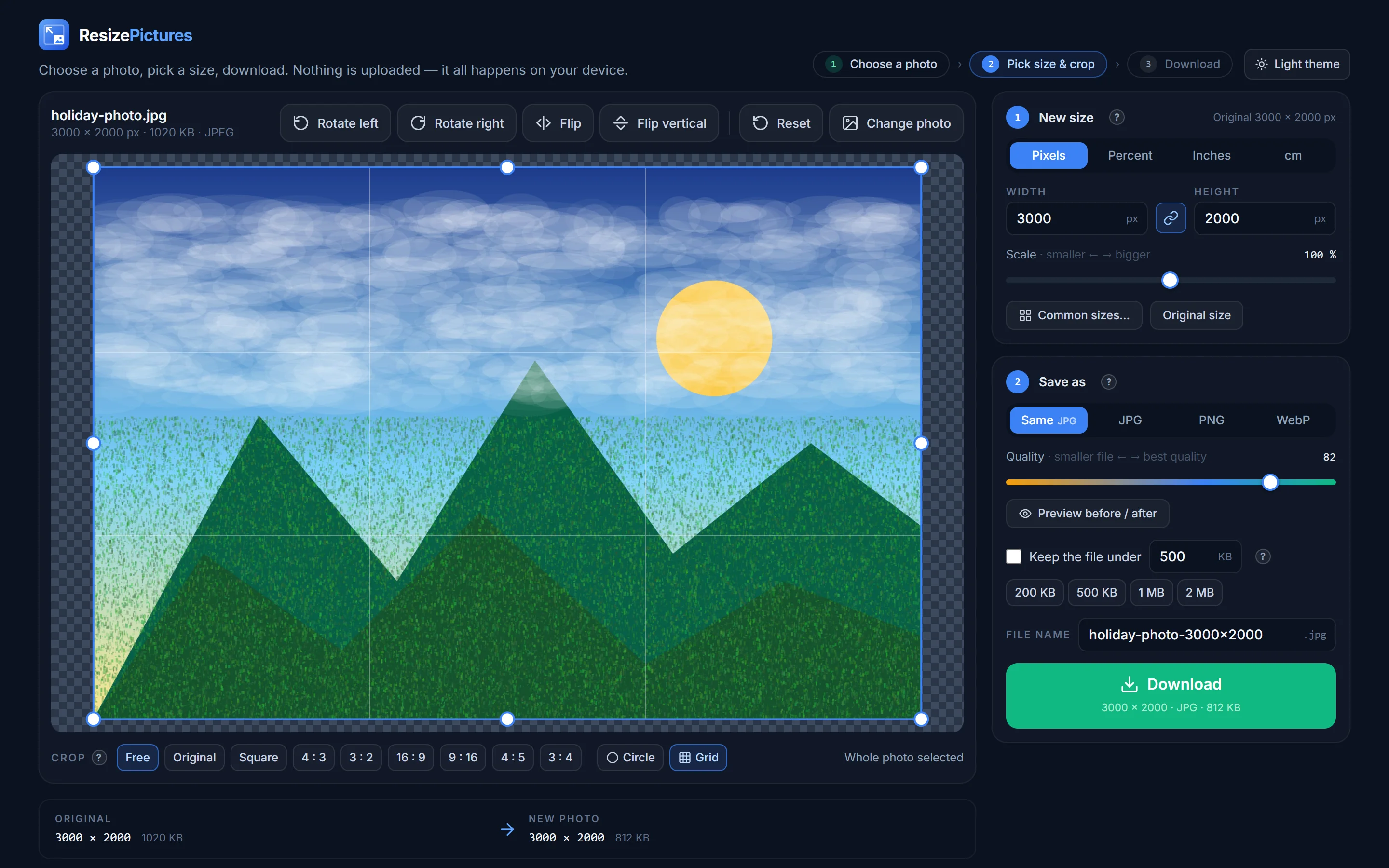
Everything you need
Most “resize” tools stop at a width box. This one covers the whole job — the same things you would do in a desktop photo editor, without the desktop photo editor.
Exact pixels for the web, a percentage to shrink quickly, or inches and centimetres at 300 DPI for printing. Proportions are kept automatically, so nothing looks stretched.
Square, 4:3, 16:9, 9:16 stories, 3:4 passport photos — or drag the frame freely. Turn on Circle for a round profile picture with a transparent background.
Sideways phone photo? One click turns it the right way up. Flip horizontally to un-mirror a selfie.
Instagram, Facebook, X, LinkedIn, YouTube, TikTok, Pinterest, WhatsApp; HD and 4K screens; US, UK/EU, China and India ID photos; 4×6 to A4 prints.
A quality slider with a live file-size preview, or simply “keep the file under 500 KB” — the tool finds the best quality that fits.
Resizing runs inside your browser. Your picture is never uploaded, and the original file on your computer is never touched.
Popular sizes
Click a size and the resizer opens with it already set — drag the frame over the part of the photo you want to keep, download. Forty more are inside under Common sizes, and the social media, passport photo and print guides explain the numbers.
Resize a photo now| Use | Size | Ratio |
|---|---|---|
| Instagram post (square) | 1080 × 1080 px | 1 : 1 |
| Instagram story / Reel · TikTok | 1080 × 1920 px | 9 : 16 |
| Facebook cover photo | 820 × 312 px | 2.63 : 1 |
| X (Twitter) header | 1500 × 500 px | 3 : 1 |
| YouTube thumbnail | 1280 × 720 px | 16 : 9 |
| Profile picture (most sites) | 400 × 400 px | 1 : 1 |
| US passport / visa photo | 600 × 600 px (2 × 2 in) | 1 : 1 |
| UK · EU · Schengen passport photo | 413 × 531 px (35 × 45 mm) | 7 : 9 |
| Photo under 50 KB (exam & visa forms) | ≈ 500 × 500 px · JPG | any |
| Full-HD wallpaper | 1920 × 1080 px | 16 : 9 |
| 4 × 6 in print at 300 DPI | 1200 × 1800 px | 2 : 3 |
| E-mail friendly photo | 800 × 600 px · under 500 KB | 4 : 3 |
Guides
Short guides for the things people resize photos for most — each with links that open the resizer already set up.
Exact file-size limits for forms, exams, visas and e-mail.
2 × 2 in, 35 × 45 mm, 600 × 600 px — by country, at 300 DPI.
Instagram, Facebook, X, LinkedIn, YouTube, TikTok, Pinterest.
4 × 6 to A3 in pixels; what 300 DPI really means.
A 4 MB phone photo to 300 KB with no visible change.
Square, circle, 16 : 9, 9 : 16 or exact pixels.
iPhone photos as JPG — resized and under a KB limit if you like.
Formats, quality, printing, privacy — everything else.
Your photos stay yours
Old-style resizers send your picture to a server, process it there and keep a copy for a while. ResizePictures does the work inside your browser, so a family photo or an ID scan never leaves your computer or phone.
Questions
Short answers here; the full FAQ covers formats, quality, printing and privacy.
Yes — free for personal and commercial use, with no account, no watermark and no limit.
No. Everything happens inside your browser. Only files your browser cannot open by itself (for example HEIC photos from an iPhone) are converted on our server in memory and immediately discarded.
Open it, choose a smaller size or percentage, and tick “Keep the file under” with the limit in KB. The quality is lowered just enough to fit.
Open JPG, PNG, WebP, GIF, BMP, HEIC/HEIF, TIFF, PSD, AVIF and SVG; save as JPG, PNG or WebP.
Choose JPG, tick “Keep the file under”, type the number, download. For tiny limits also reduce the pixels — about 500 × 500 px fits under 50 KB. See the resize-to-KB guide.
Yes. HEIC files open directly; choose JPG under Save as and you get a normal JPG that any form, website or Windows PC accepts. See HEIC to JPG.
Open the resizer, drop in a picture and have the right size in under a minute. Free, in your browser, nothing to install.